Moet je LLM’s lokaal draaien?
When local AI models outperform API-based services
- Artikel
- Data Science
- Data Engineering
- AI


Large Language Models (LLMs) zijn in korte tijd een standaard onderdeel geworden van moderne applicaties. De meeste teams starten met het integreren van modellen zoals OpenAI of Claude via API’s. Dat is snel, eenvoudig en vereist weinig infrastructuur.
Maar wat gebeurt er als:
- API-kosten stijgen?
- Modellen onverwacht veranderen?
- Je met gevoelige data werkt die je omgeving niet mag verlaten?
Voor organisaties die werken met proprietary data, hoge volumes of strikte compliance-eisen, wordt het draaien van open-source LLMs lokaal een steeds aantrekkelijker alternatief.
In dit artikel leggen we uit wanneer lokale LLM deployment zinvol is, hoe je begint en welke infrastructuur nodig is om van experiment naar productie te gaan.
Voor de leesbaarheid en vanwege gangbare terminologie binnen het vakgebied is de rest van dit artikel in het Engels geschreven.
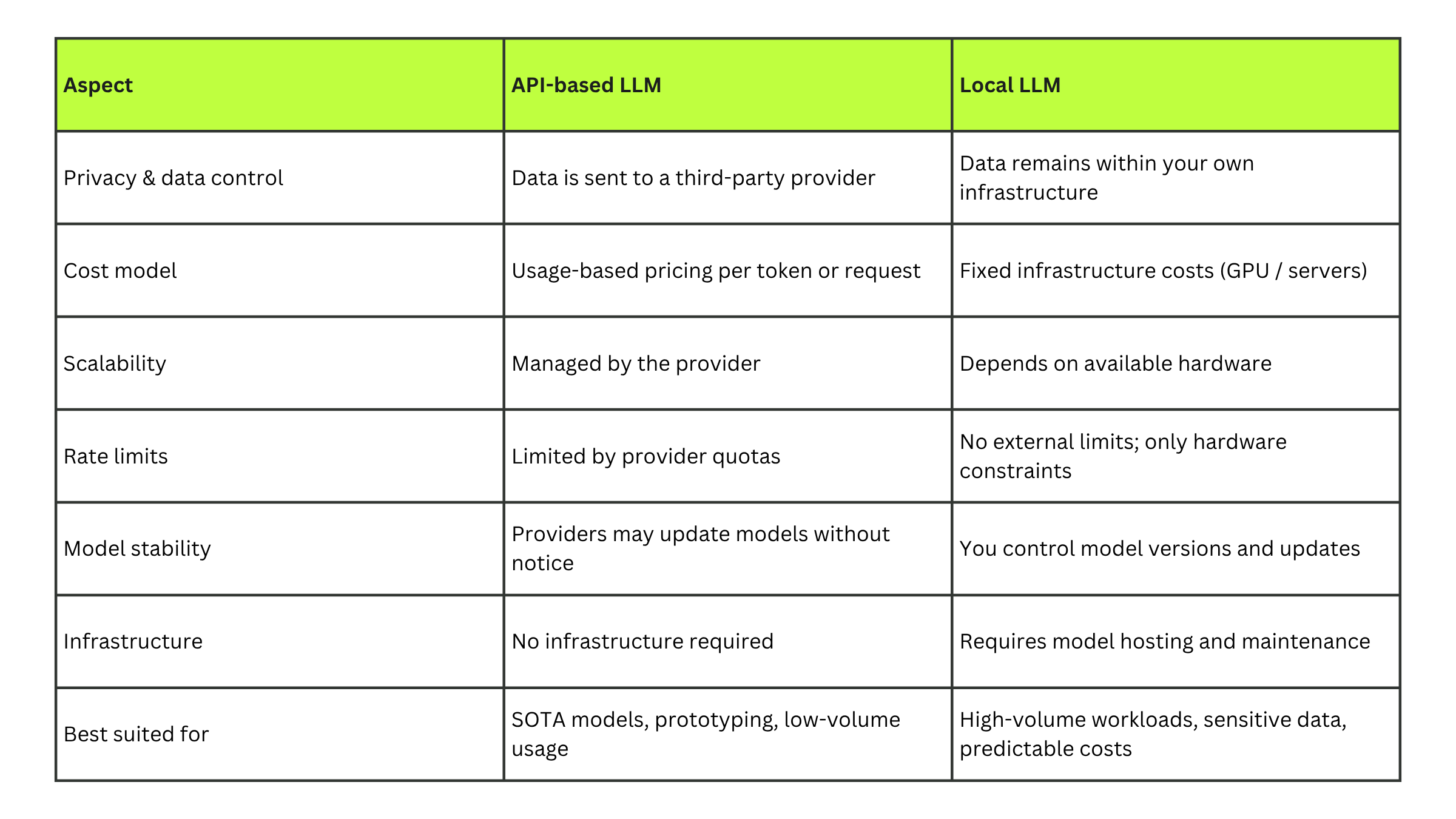
Why not just use API-based LLMs?
API services such as OpenAI or Anthropic offer powerful models that are easy to integrate. For many use cases, they remain the simplest option.
However, there are situations where local models offer clear advantages.
When running LLMs locally becomes attractive
Local deployment becomes particularly valuable when:
- You process sensitive or regulated data
- Usage volumes become large and predictable
- API costs grow significantly
- You need stable and reproducible model behaviour
Understanding local LLM deployment
Running LLMs locally involves several components. To simplify the landscape, we divide the process into five key areas:
- Local development tools
- Interfaces and user experience
- Model selection and performance
- Deployment infrastructure
- Cost considerations
1. Local development tools
Before deploying models in production, you will typically start by testing them locally. Two tools make this particularly straightforward:
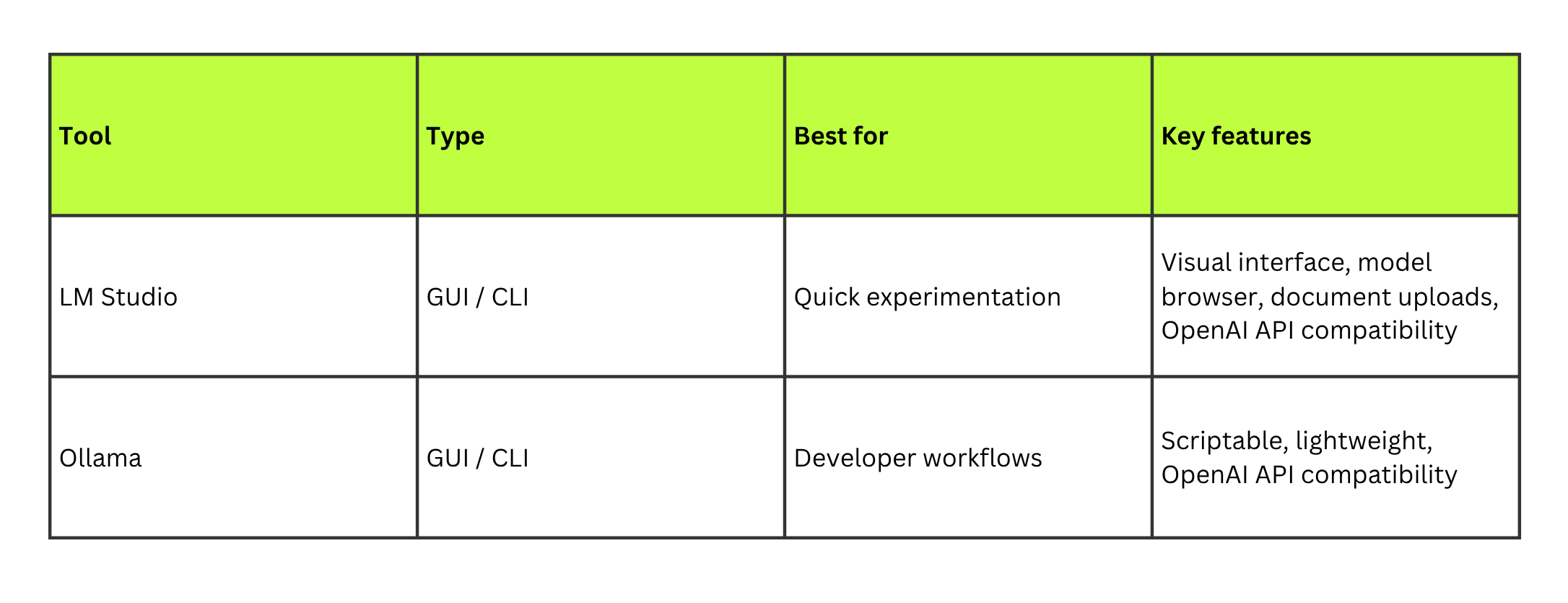
Both tools allow you to prototype locally before committing to production infrastructure.
In practice, LM Studio is often preferred for quick testing, while Ollama offers more flexibility for automation and integration.
2. Interface and user experience
Once models run locally, you need a way to interact with them.
While LM Studio and Ollama include basic chat interfaces, many teams prefer a dedicated interface layer.
Open WebUI provides a modern web interface similar to ChatGPT, but connected to your own models.
Key capabilities:
- Connect to multiple model backends
- Compare model responses side-by-side
- Share access with team members
- Manage conversation history
- Upload documents for context
This makes it especially useful when you want to give non-technical colleagues access to local AI tools.
3. Model selection and performance
Choosing the right model is essential when running LLMs locally. Model size is typically measured in parameters (billions).
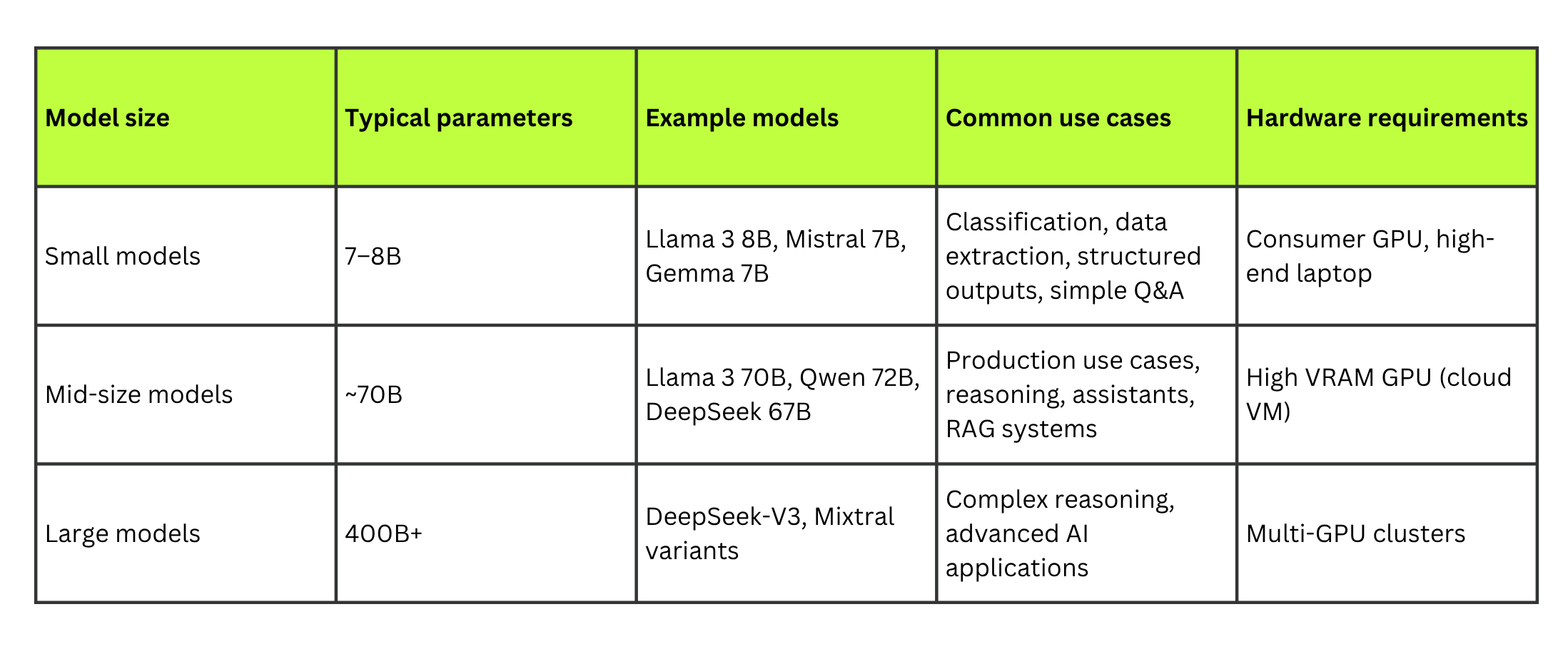
For many organisations, mid-size models around 70B parameters provide the best balance between performance and infrastructure cost. Smaller models can handle high-volume, simpler tasks, while larger models are typically reserved for specialised workloads where maximum capability is required.
4. Deployment and infrastructure
Once you move beyond experimentation, you need infrastructure capable of serving models reliably.
Running models locally
Your own laptop or workstation is often sufficient for development.
This works well when:
- testing integrations
- experimenting with prompts
- running smaller models
Deploying to GPU virtual machines
For production workloads, a GPU-enabled VM is typically required.
This is necessary when:
- multiple users access the model
- uptime and reliability are important
- larger models require more VRAM
- higher throughput is required
Typical deployment setup
A common architecture includes:
- GPU VM
- Ollama running the model
- Nginx reverse proxy
- client applications connecting via API
This setup provides an OpenAI-compatible endpoint that you control entirely.
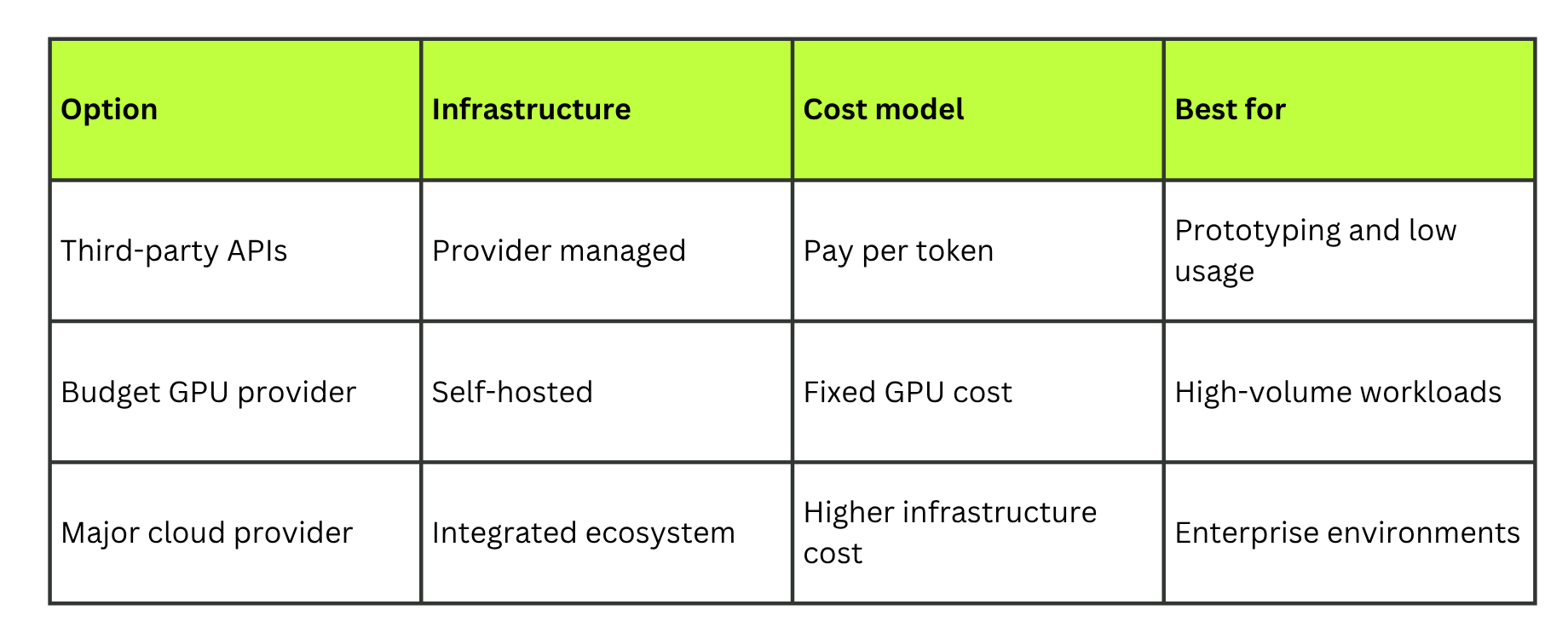
5. Cost considerations
There are generally three ways to serve LLMs:
When does local deployment make sense?
Local models are particularly valuable when:
- Workloads are high volume and predictable
- Batch processing tasks analyse large datasets
- Multiple use cases share the same infrastructure
- Data privacy requirements prevent external sharing
Many organisations adopt a hybrid strategy, combining local models with external APIs depending on the task.
Conclusion
Running open-source LLMs locally gives organisations significantly more control over their AI infrastructure.
You gain:
- full data privacy
- predictable infrastructure costs
- independence from API rate limits
- stable model behaviour in production
For teams exploring this approach, a practical path forward is:
- Start small
- Experiment locally using tools such as LM Studio or Ollama.
- Choose the right model
- Match model size to the complexity of your task.
- Scale thoughtfully
When moving to production, evaluate whether a budget GPU provider or a major cloud platform fits your architecture best.
Local LLMs are not always the right solution, but for many organisations they give greater flexibility, control and cost efficiency in modern AI systems.
Dit is een artikel van Bob Strube
Bob is Data Engineer bij Digital Power en specialiseert zich in AI en schaalbare dataplatformen. Hij heeft machine learning- en GenAI-oplossingen gebouwd en uitgerold op Azure en Databricks. Hij helpt organisaties om van experiment naar productie te gaan met betrouwbare, kostenefficiënte en privacyvriendelijke infrastructuur.
1x per maand data insights, praktijkcases en een kijkje achter de schermen ontvangen?
Meld je aan voor onze maillijst en blijf 'up to data':