Hoe bouw je een sterk cloud governance framework op?
Ontdek de 5 kernprincipes die cloud governance aansturen
- Artikel
- Data governance
- Data Engineering


Werk je steeds meer in de cloud? Dan is het tijd om na te denken over governance. Met duidelijke afspraken en controles houd jij grip op je cloudomgeving – van kosten en security tot compliance. Zo voorkom je beveiligingsproblemen, onnodige uitgaven of het niet voldoen aan compliance-eisen.
*Het artikel is geschreven in het Engels voor een betere leesbaarheid.
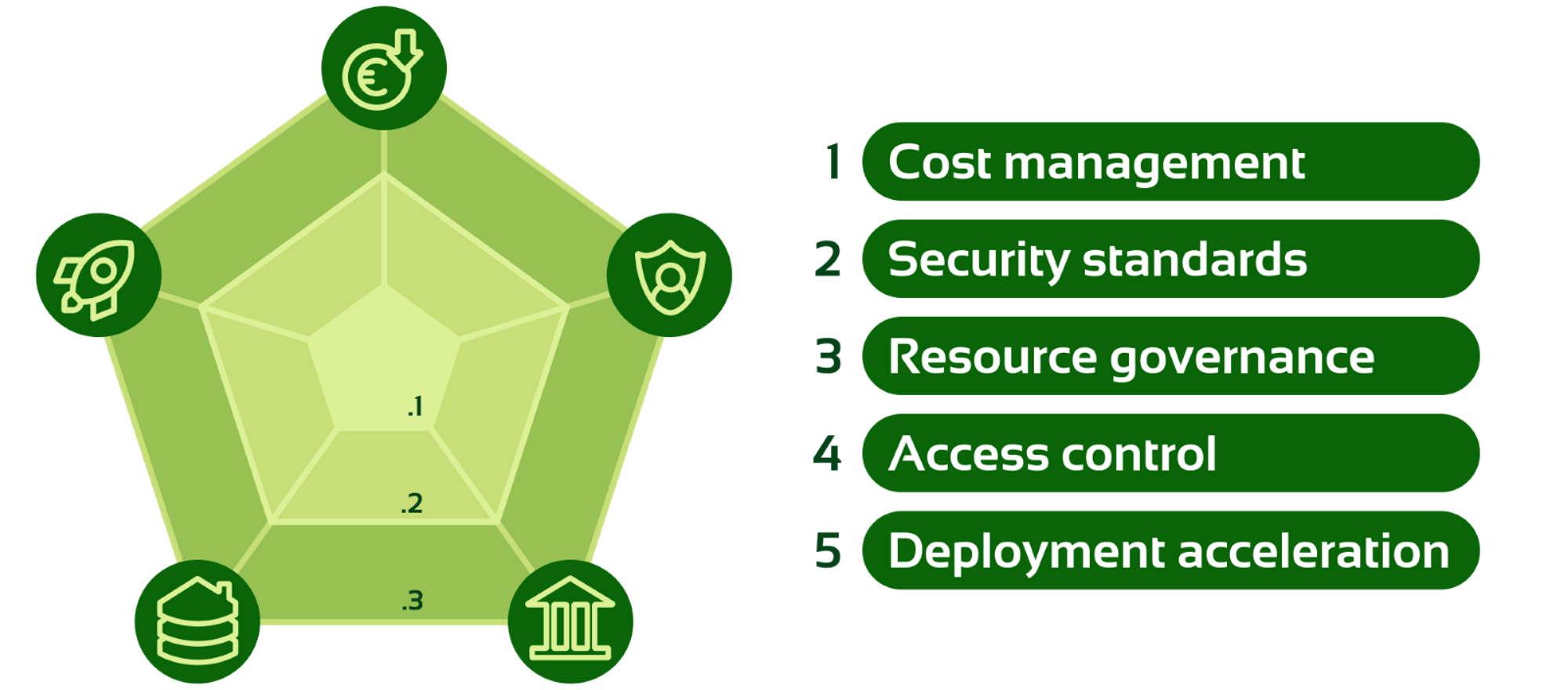
Cloud governance focuses on five key disciplines:
- Cost management
- Security standards
- Resource governance
- Access Control
- Deployment acceleration
Each discipline contributes to creating a robust framework that minimises risks and maximises efficiency.
Discipline 1: Cost management
Effective cloud governance begins with cost optimisation. As your organisation mature, you move from basic cost awareness to fully managed and optimised cloud spending. This progression allows for better control over cloud expenses, ensuring that you get the most out of their cloud investments while maintaining financial discipline.
Level 1.1 Basic cost management
You can start by tracking cloud costs, setting up alerts and reports to stay within budget.
Level 1.2 Cost allocation to business units and applications
Next, your organisation allocates cloud costs to specific business units (BUs) and applications. This makes departments accountable for their spending and helps identify which areas use the most resources, improving cost control.
Level 1.3 Automated cost optimisation
At the highest level, cost management is automated. Tools like Azure Advisor, AWS Cost Anomaly Detection, and GCP Recommender provide real-time recommendations to reduce waste. Infrastructure is deployed only when needed, and unused resources are scaled down (as discussed in discipline 5 – deployment). Tools like Terraform Nuke remove unused resources, ensuring a cost-efficient cloud environment.
Discipline 2: Security policy
Establishing a security baseline is critical to protect cloud environments from potential risks and ensure compliance with organisational policies. A well-defined and enforced security baseline allows your teams to build on the cloud securely without having to reinvent security practices for each project. This helps avoid common security gaps while maintaining agility.
Level 2.1 Documented policy
The first step is to create a clear, documented security policy. This outlines the security standards and guidelines that teams must follow when operating in the cloud. While it doesn't enforce controls, it provides a framework for secure cloud adoption.
Level 2.2 Implemented policy
As your organisation mature, the documented policy is translated into enforceable security controls. These controls are applied consistently across the cloud environment, ensuring security policies are followed in practice. This reduces risks and improves compliance by standardising security measures across all workloads.
Level 2.3 Automated, idempotent policy with review cycle
At the highest level of maturity, security policies are automated and idempotent, meaning they are self-correcting and consistently enforced without manual intervention. Automation tools like Azure Policy, AWS SCPs, or Terraform Sentinel can enforce these policies across cloud environments. Additionally, a structured review cycle ensures that security measures remain up to date with evolving threats and compliance requirements.
NOTE: While cloud security and networking are crucial for securing cloud systems, we have deliberately omitted their implementation from this blog. These topics require separate focus. This chapter focusses on governance by establishing policies and control to ensure security standards are consistently applied over the cloud environment.
Discipline 3: Resource governance
Resource governance ensures cloud environments are well-organised, manageable, and scalable. It involves applying uniform standards for naming, deployment, and policy enforcement to keep the cloud clean and structured.
Level 3.1 Consistent naming and tagging
The first step is to set up clear naming rules and automated tagging for all cloud resources. This makes it easier to find, manage, and organise resources by project, team, or environment. It also helps with cost tracking and prevents mistakes.
Level 3.2 Resource usage logging
Next, you can add logging to track how resources are used. Tools like Azure Log Analytics, AWS CloudWatch, or Google Cloud Operations collect data on performance, usage, and costs. This gives teams insight to solve issues faster and keep operations efficient.
Level 3.3 Enterprise landing zone
At a more advanced level, your organisation builds an enterprise landing zone. This is a central, well-managed cloud environment with shared services like networking and logging. The central IT team manages these, while individual teams control their own workloads. This ensures security, cost control, and flexibility across the organisation.
Discipline 4: Access control
Access control is a critical aspect of cloud security and governance. It ensures that the right individuals have the right access to the right resources at the right time. Effective access control reduces the risk of unauthorised access, helps maintain compliance, and minimises the potential attack surface in a cloud environment.
Level 4.1 Role-Based Access Control (RBAC)
This is the first step in managing access. Your users get permissions based on their role in the organisation. RBAC makes it easier to manage who can access what and keeps permissions consistent. Roles and access are clearly defined and linked to job responsibilities.
Level 4.2 Least privilege
This means users only get the minimum access they need to do their work. It reduces the risk of unauthorised or unnecessary access to sensitive data. Least Privilege is often used together with RBAC. Roles are defined more narrowly, and access is further limited—for example, to specific databases or applications, or by blocking certain actions within a resource.
Level 4.3 Just-in-time access
This gives users temporary extra permissions only when needed and with approval. Access is limited to a short time and removed when the task is done. This reduces risk and keeps privileged access under control. Cloud providers like Azure, AWS and Google Cloud offer tools to make JIT access easy to manage in the cloud.
Discipline 5: Deployment acceleration
Deployment acceleration aims to streamline the introduction of new workloads into the cloud, enhancing efficiency over time. While the initial deployment process may still require significant effort, the focus is on optimising speed and consistency for future deployments.
Level 5.1 Manual or non-standardiseddeployment
The initial stage often involves manual or non-standardised deployments, leading to inconsistencies and inefficiencies in the cloud environment.
Level 5.2 Infrastructure as Code (IaC)
The next step is adopting infrastructure as code practices, allowing for automation and standardisation across all deployments—not just in production. This reduces manual errors and improves consistency. It also enables easy deletion of resources when projects end, avoiding stale resources that incur unnecessary costs.
Level 5.3 Test-driven release management
At the most advanced level, you can implement test-driven release management, enabling continuous integration and delivery. This approach ensures new workloads are deployed swiftly and reliably while maintaining operational excellence.
Ensure control, security, and scalability in your cloud environment
Curious about how your organisation is performing when it comes to cloud governance? Our Cloud Governance Review provides clear insights into areas for improvement, along with practical recommendations. We also offer support with the implementation of an Azure Cloud Governance framework, giving you control, security, and scalability in your cloud environment. Feel free to get in touch for more information.
Dit is een artikel van Michael Hogervorst, Data Engineer bij Digital Power
Michael is een veelzijdige expert met een achtergrond in Cloud Architectuur, Data Engineering en Data Science. Hij blinkt uit in het bouwen van datateams en het implementeren van geavanceerde dataplatforms, waarbij hij zijn uitgebreide ervaring inzet om organisaties te ondersteunen bij het realiseren van effectieve, datagedreven oplossingen.
Receive data insights, use cases and behind-the-scenes peeks once a month?
Sign up for our email list and stay 'up to data':