The impact of server-side tracking on privacy
Best practices and debunking myths

In the digital age, where data privacy has become a forefront concern, server-side tracking stands out as a crucial tool for organisations aiming to gather user insights responsibly. Despite its potential, numerous myths surround its use and compliance with regulations. This article dispels these myths, offering a nuanced view of server-side tracking, its compliance with privacy laws, and the role of consent in its execution.
Understanding client- versus server-side tracking
First, let's recap what server-side tracking entails. The main difference is in the way these technologies, feed data to end-points.
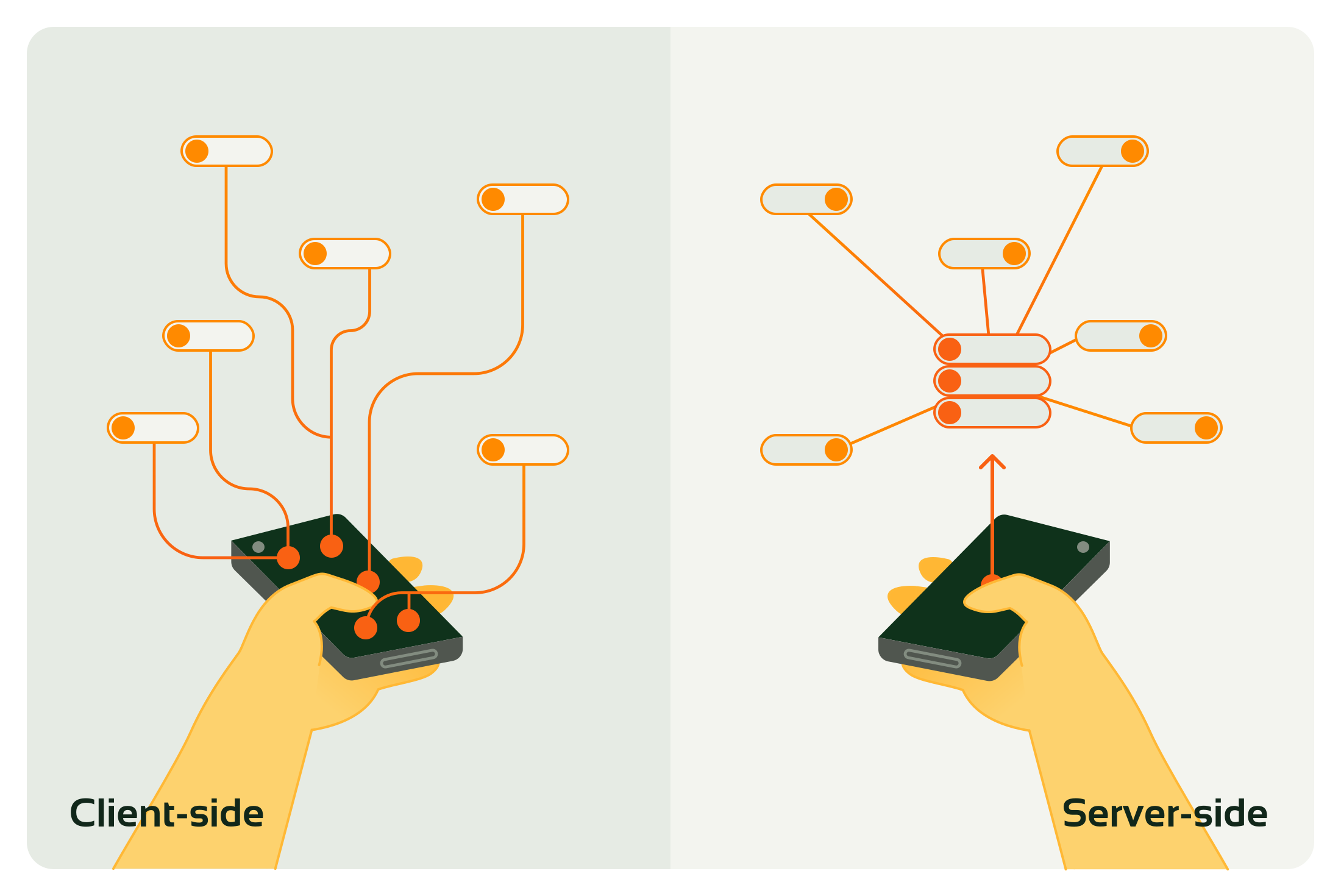
With client-side tracking, data requests are generated directly from the user's device to your designated endpoints. Conversely, with server-side tracking, requests are sent to a server environment managed by your organisation, which then distributes this data to different endpoints via a server-to-server connection.
If you want to read more about how to set-up a compliant server-side tracking implementation, this more technical blog will help you get started!
In case you want to dive more deeply into what server-side tracking is not, read this blog.
Privacy regulations and server-side tracking
How you implement your privacy governance is not specifically bound to a client- or server-sidetracking mechanism. Especially for the GDPR, your mechanism for lawful processing of personal data is likely compatible and consistent between client- and server-side tracking.
Server-side tracking may help to reduce compliance risks by keeping certain personal data within your organisation. With client-to-server HTTP requests, information like IP addresses, User-Agent strings, and URLs is shared. This can be considered as personal data under GDPR. This data becomes more sensitive when shared with large organisations that receive similar data from other sources.
By using server-side tracking, this information remains internal, allowing full control of what is shared with whom. This reduces impact on users and provides control over its disclosure to third parties. This integration into your privacy strategy allows you to selectively share information that aligns with your privacy standards and goals.
Next, we'll address several myths related to consent in the context of server-side tracking:
Myth 1: “Consent is not necessary for server-side tracking”
Commonly heard misconceptions are: "We only ask for consent for cookies, and server-side tracking doesn't use cookies, so we don't need consent." Or "With server-side tracking, we can track 100% of all users without needing consent."
These statements are not true:
Legal Foundations: The ePrivacy Directive (incorporated into localised laws) relates to cookies and the use of device storage, requiring consent. The GDPR, on the other hand, requires valid grounds for processing personal data. Under the GDPR, the terms 'processing' and 'personal data' have broad definitions that may be more extensive than initially thought.
Examples:
- If your website or application uses unnecessary cookies, local storage, session storage or other server-side tracking methods for user identification, you still need consent.
- If your website or application modifies personal data before it is sent, such as anonymising it or sending it directly to the server, this is considered processing. The rules in Article 6 of the GDPR regarding the processing of personal data must then be followed.
Myth 2: Compliance Is unachievable with server-side tracking
Statements such as “Server-side tracking is never compliant as you are always processing data from an individual“ or “It is impossible to manage compliance with server-side since it lacks transparancy to the user” are the commonly heard statements.
Whilst it is true that there are challenges for obtaining a compliant server-side tracking implementation, they aren't that different from a client-side tracking implementation.
The key to ensuring compliance from the start is to filter information before sending it server-side, based on valid grounds like consent or legal obligation. Additionally, categorising data according to its purpose is recommended for maintaining transparancy and compliance.
Examples:
- If a website or application sends IP addresses to the server-side, it should be transparent about the purpose for which it is processed. IP addresses may be processed and stored for registering consent preferences, but they should only be used for insights or activation with the appropriate consent level based on other attributes.
- Clearly explain how and why specific data is processed. By categorising data attributes based on purpose and legal grounds, you provide transparency.
- If different legal grounds are used for one or more data attributes, ensure that users are informed of their rights for each version of the data and how they can exercise those rights.
- Implementing limitation of usage based on purpose at the initial data collection step helps minimise the risk of engaging in non-compliant practices.
Best practices for implementing compliant server-side tracking
In short, server-side tracking helps your organisation decide which data to share and when to share it. However, it doesn't fully address all the privacy rules your organisation must follow by itself.
Here is a list of the best practices for server-side compliancy:
- Privacy by design: integrating privacy considerations early in the design process. Ensure that the default behaviour aligns with the principles outlined in privacy regulations.
- Consent management integration: Implementing robust consent management processes on the client side to prevent unlawful data processing.
- Regular audits and updates: Importance of ongoing checks and adaptations to remain compliant.
Given the many benefits of server-side tracking from a value perspective as explained here, we recommend considering the extra controls and risk reduction as a benefit in favour of server-side tracking.
Need help implementing server-side tracking?
Let our Technical Web Analysts guide you through the process seamlessly! Contact us or schedule a meeting directly here.
This is an article by Bram Ooms
Bram started as a Technical Web Analyst in 2019, where he focused on data implementations at clients such as Univé, DPG Media, Boels and Vodafone. Through his experiences with the impact of legislation on enabling data flow he developed an interest in data privacy, which he is now actively pursuing within Digital Power.
Receive data insights, use cases and behind-the-scenes peeks once a month?
Sign up for our email list and stay 'up to data':