What is Tagbird, what do you use it for, and what can you do with it?
Test your analytics implementation with our Chrome extension

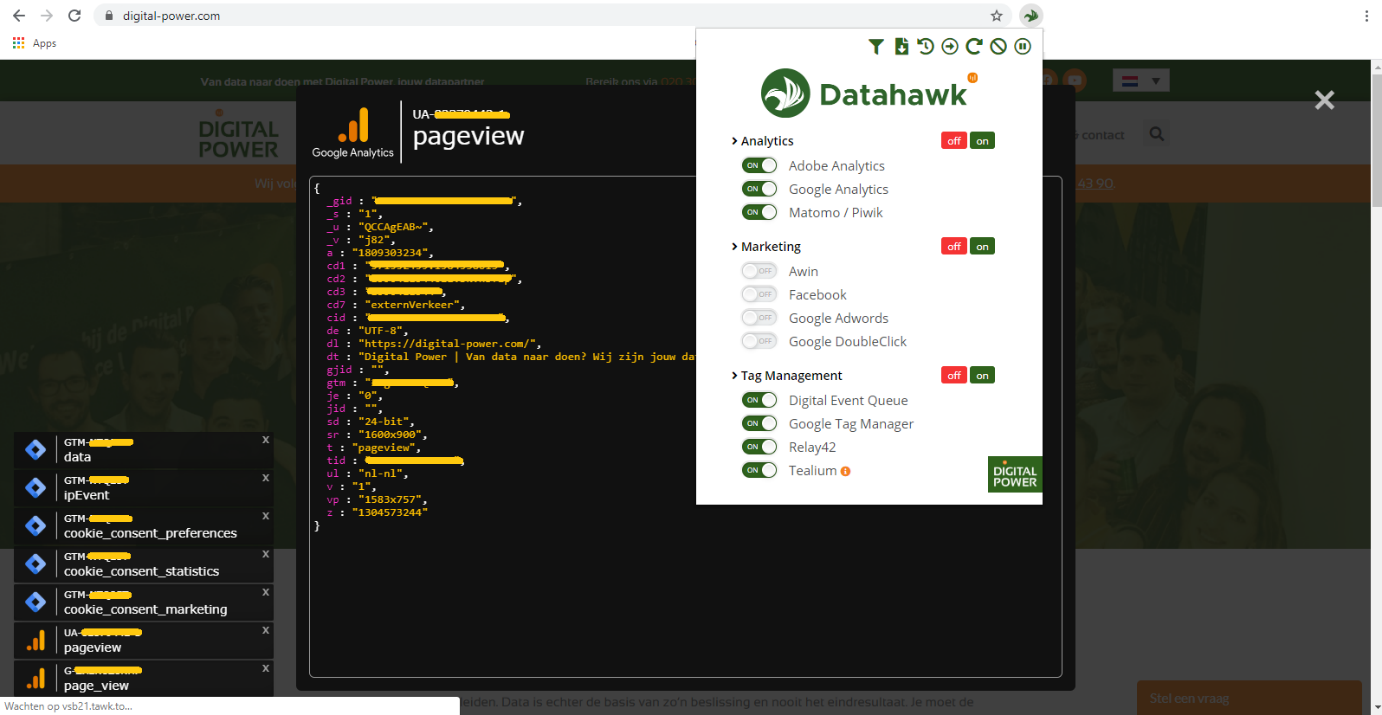
Tagbird is a Chrome extension developed by Digital Power. You can download it from the Chrome Web Store and add it to your browser. It is a debug/visualisation tool that provides a simple and clear insight into, among other things, the data layer, tag management events and analytics requests of a website. So you can quickly and easily test your entire analytics implementation with Tagbird.
This article will tell you how Tagbird can help you in your work as a Technical Web Analyst. Are you excited? Easily add the free extension to your browser and download the Tagbird manual.
Tagbird helps you debug the following implementations:
Analytics
- Adobe analytics
- Google analytics
- Matomo/Piwik
Marketing tags
- Awin
- Google Doubleclick
- Google Ads
Tag Management Systems
- Digital Event Queue (DEQ)
- Google Tag Manager (GTM)
- Relay42
- Tealium
Why every Web Analyst Should use Tagbird
Looking back, I didn’t fully realise how valuable Tagbird was when I first started my career as a Technical Web Analyst - it was simply always there. Over time, working alongside teams who operate without it has given me a new perspective. It’s shown me how different—and often more complex—the work of web analysts and developers can be without Tagbird, and that’s where my appreciation really grew.
Without Tagbird, you have to rely on very labour-intensive and cumbersome methods to watch:
- What your data layer looks like on each page (depends on the tag manager, but you'll need at least the developer console or the debug mode in GTM for that);
- Which events are fired by the tag manager (each tag manager then has its own solution for that);
- When an event is fired (you then have to look in the network tab of developer console);
- Which data is actually sent to your analytics platform (Google Analytics/Adobe Analytics). You can see this in the developer console or with the help of platform-dependent debug tools, none of which provide as clear a view as Tagbird).
In short, I’ve seen just how complicated it can get to retrieve insights that Tagbird puts at your fingertips in seconds.
What Tagbird is very good at:
- Creating an overview of all the information you need (in other words: clearly bundling the different events of different tools);
- Making the timing of events very clear (did this event actually fire when I pressed that button?);
- It works super intuitive. You don't need any programming/developing skills to understand and use Tagbird. This also allows you to use Tagbird to give Analysts more insight into where the data they work with comes from. Analysts can also easily debug with it if they see something strange in the data. They do not need any technical knowledge for this;
- It's reliable. The information I see in Tagbird always matches the information I can retrieve manually via the Developer Console.
An additional advantage of Tagbird: it has a handy button with which you can also see old events (from the previous page, for example) in your overview (eg. very useful when testing exit links, button click events that lead you to the next page, etc.). Without Tagbird, that information is not easy to retrieve.
What colleagues say about Tagbird:
"The tool saves you a lot of time with testing. You can see very clearly what is happening on a page in terms of tag management and what goes to analytics. If you want to do that in a different way, you will be doing a lot of manual work in the DevTools (Console, network, application), and it is often quite cluttered there.
For my work as a Technical Web Analyst, it's just a super handy tool.For example, downloading a complete data layer is a very nice feature. This gives you instant documenting, and you can still find out afterwards what happened on a page. I can recommend this tool to every developer!"
– Stef Gramser, Technical Web Analyst at Digital Power
"Debugging with Tagbird is super fast, easy and clear. You can see at a glance the variables in the data layer, which data you send to the web analytics tool and all tag manager events. It combines all information from the most used analytics platforms and tag managers.
Thanks to Tagbird, I have a clear overview of all the data I need to debug my analytics implementation, bundled and immediately available on my screen."
– Pamela Greveling, former Technical Web Analyst, Digital Power
What I mainly use Tagbird for:
In reality, Tagbird is part of nearly every aspect of my work as a Technical Web Analyst:
- Once I have created and delivered a tag plan, I use Tagbird to test whether the web developers have delivered the data layers correctly.
- When I'm done testing the data layer, I use screenshots from Tagbird to provide clear and well-organized feedback to the developers about any errors.
- Once I have created a tag, I use Tagbird to test if the tag is working correctly.
- When I get questions about a particular event or analytics variable, I use Tagbird to find out where and how that event/variable is set.
- If I suspect something is going wrong in the data layer/tag manager/analytics data, I use Tagbird to debug where the problem is occurring and which step in the implementation is to blame.
Getting started with Tagbird
Tagbird is a handy tool to debug the web analytics implementation of various analytics tools. It works faster than alternative debugging methods, and several of our Technical Web Analysts report that Tagbird makes their job considerably easier.
Tagbird is intuitive and you don't need any technical knowledge to use this tool. This makes it a great addition in communication between (technical) web analysts and developers.
Tagbird's strength is that it can convert very complicated debug operations into one simple overview.
Are you enthusiastic and enjoy taking on challenges using tools like Tagbird? We at Digital Power are looking for Technical Web Analysts and would love to meet you! Check out our vacancy.
This is an article by Andana Borcan
Andana Borcan serves as Operations Manager at Digital Power, where she and her team are committed to delivering high-quality data. After all, strong insights start with reliable data. Over the years, she has helped multiple clients set up robust analytics implementations for both web and (native) app environments
Receive data insights, use cases and behind-the-scenes peeks once a month?
Sign up for our email list and stay 'up to data':